Private copy and paste
Copy here. Paste there. Nowhere else.
Bridjit connects two apps you choose, on one device or across your phone and computer, and delivers what you copy only to that app. Everything else is denied by default. Nothing touches a cloud.
The problem
Your clipboard is a broadcast.
Moving text from your laptop to your phone shouldn't mean every app and every device gets a copy. Today it usually does.
Sync tools mirror it all
Universal clipboards copy everything you copy to every device you own. Passwords and one-time codes included.
You email yourself
Notes-to-self sit in a mail server forever, next to everything else, readable by whoever gets in.
Chat becomes a clipboard
Pasting into a message to yourself puts it on someone else's servers and in every chat backup.
How it works
Two apps. One bridge. Your call.
Pair your devices once
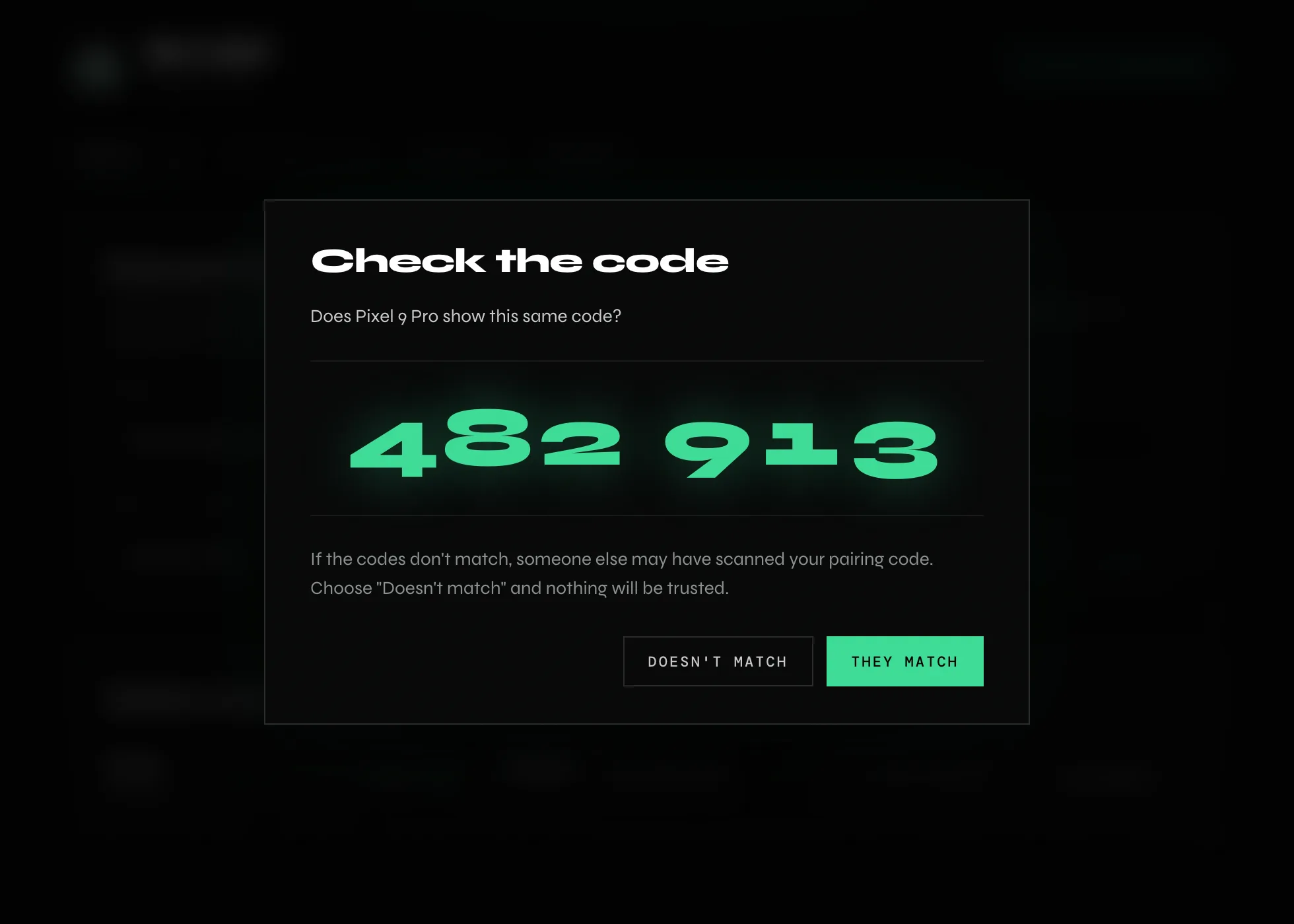
Scan a code from your other device, then check both screens show the same six digits. If they match, nobody is in between.
Pick a source and a target
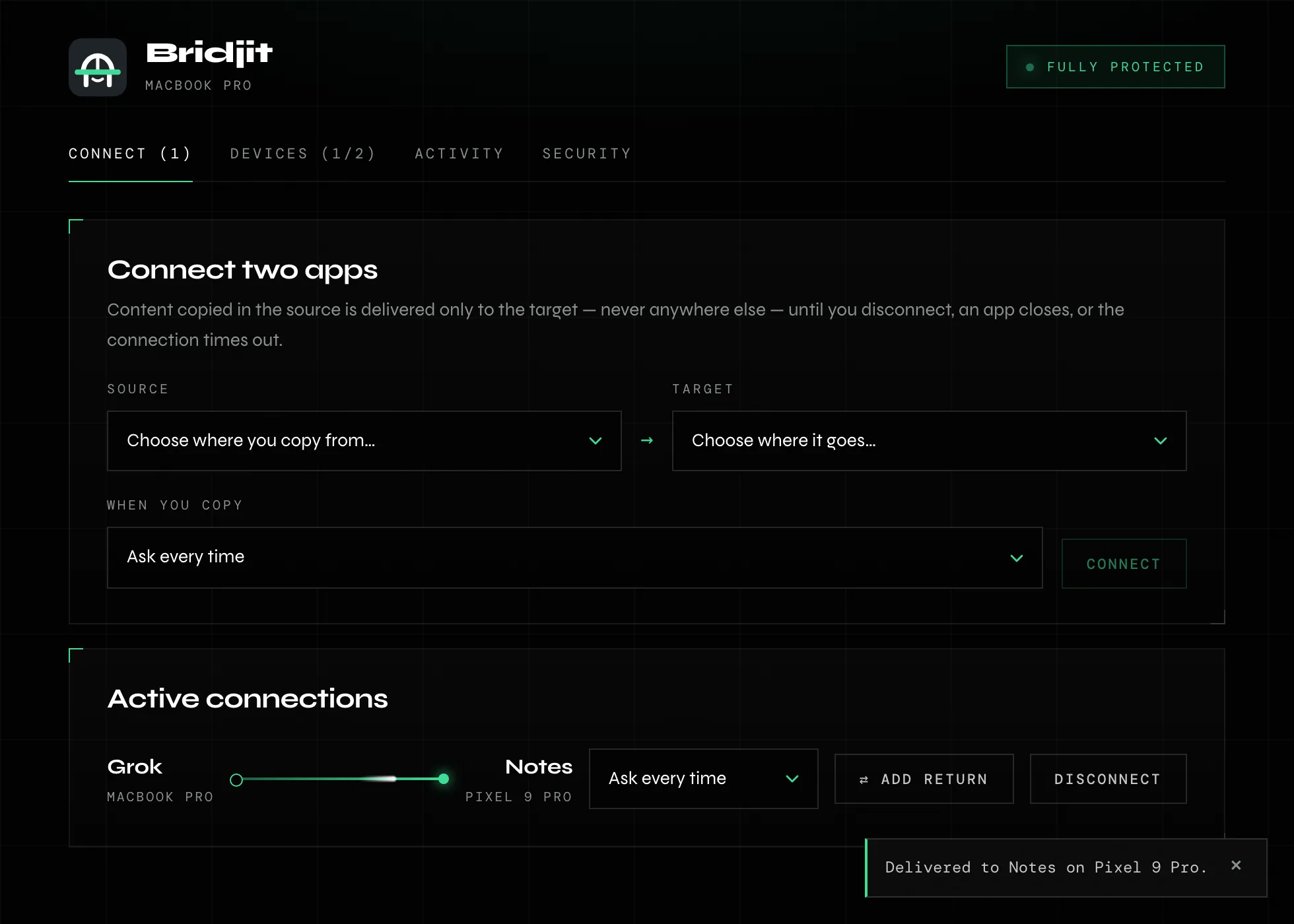
Choose where you copy from and where it should land, on this device or another. The connection lasts for this session and ends when an app closes, a device drops off or you disconnect.
Copy like you always do
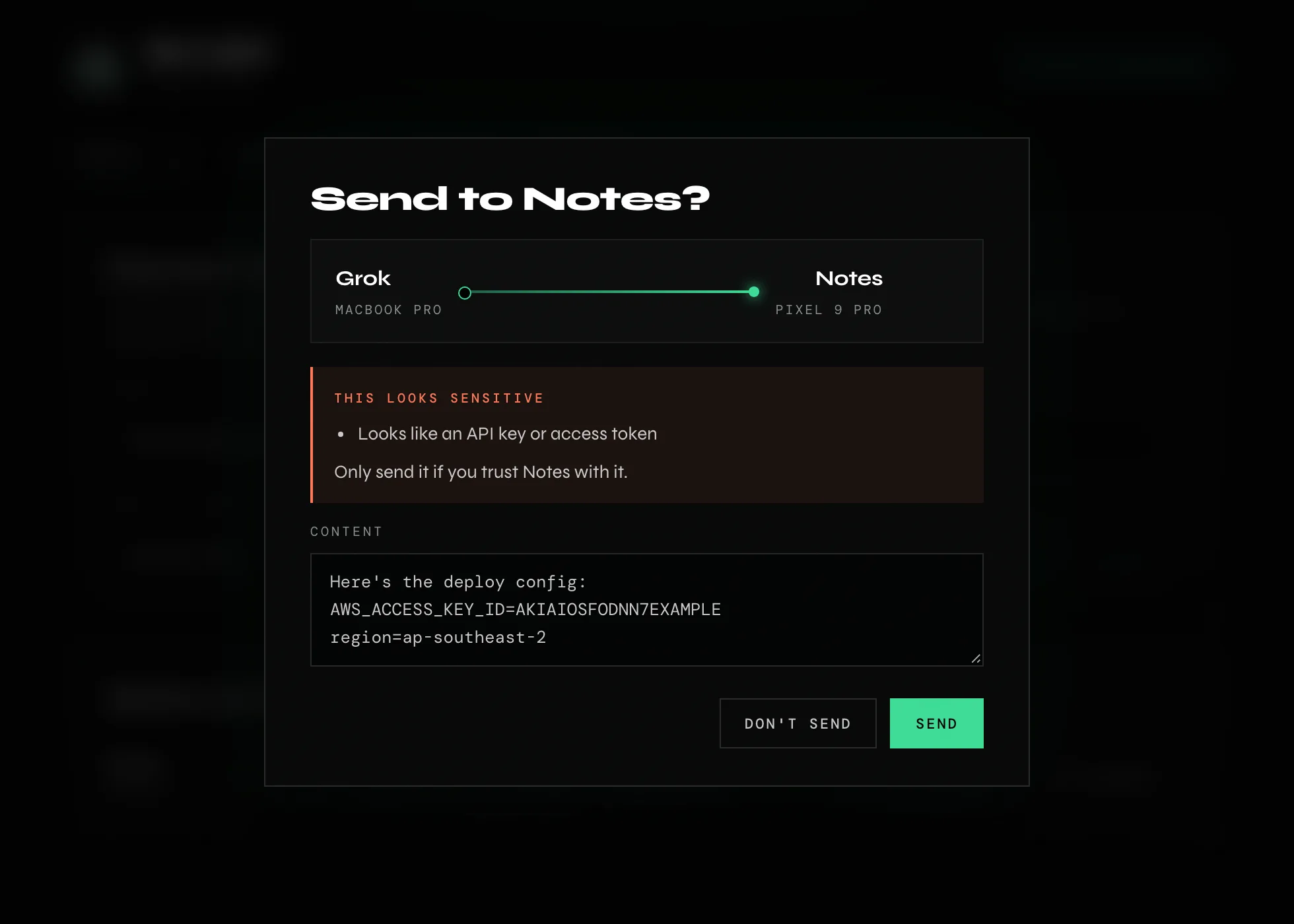
It arrives in the target and nowhere else. The first few transfers ask first, and anything that looks like a password, key, card number or code asks every time by default.
The app
Calm when it's quiet. Loud when it matters.
One screen to connect apps, one to see your devices, one to check what moved. When something looks sensitive, Bridjit stops and shows you exactly what's about to go where, and lets you edit it first.
Security
Denied by default.
Security isn't a feature of Bridjit. It's the reason it exists. Every part was designed from the threat model out, and it's honest about the limits.
Bridjit only ever delivers content to apps you've connected in this session. Everything else is denied.
What Bridjit guarantees
- Only live connections receive. A delivery needs a connection you made, this session, to that exact app on that exact device.
- Checked again at delivery. If a connection ends while a prompt is open, nothing goes through.
- Only your devices can read it. Between devices, content is end-to-end encrypted to the paired device.
- No servers, no telemetry. Bridjit never sends your content to a server, and it doesn't phone home.
- The log never holds what you copied. Activity shows what moved and where, never the content itself.
What it can't do, and says so
- The system clipboard is shared. When you copy the normal way, other apps allowed to read the clipboard can see it. Where Bridjit captures text itself (its keyboard, share sheet or selection menu), it never touches the clipboard at all.
- A compromised device is compromised. No app can protect you from a hacked operating system or a malicious keyboard.
- Delivered means delivered. Once text lands in the target app, it belongs to that app.
| Layer | What it says | How long | How you grant it |
|---|---|---|---|
| Device | "This device is mine" | Until you un-pair it | Scan a code, compare six digits |
| Connection | "App X may send to app Y" | This session only | Pick a source and a target |
| Transfer | "Send this, now" | One transfer | Ask, automatic or paused, with safeguards |
All three have to pass, every time.
Devices
Phone to laptop. Laptop to phone. Same rules.
The same security core runs on every platform, so a connection behaves the same wherever it starts. Each platform gets the most private way in that it allows.
macOS
Lists your apps, captures copies only in connected sources, and pastes into the target for you. Lives in the menu bar.
Android
A Bridjit keyboard and the text-selection menu send without touching the clipboard. Received text waits on the keyboard until you tap paste.
iOS
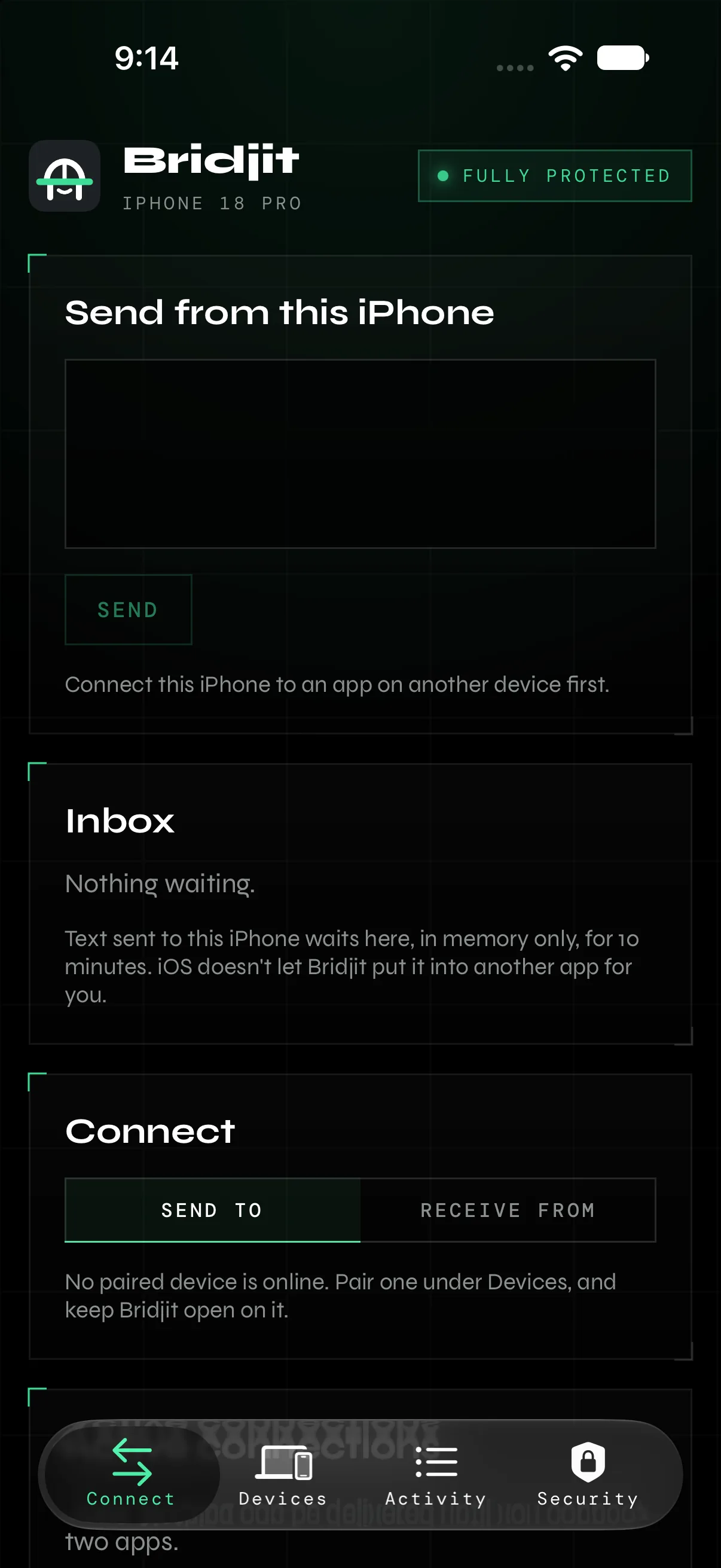
Send from Bridjit or from the share sheet. iOS won't let any app type into another, so received text waits in Bridjit's inbox for ten minutes.
Windows & Linux
Pair and receive today. Full support is planned.
Nearby, without a code.
Turn on Nearby for five minutes to find a device on the same network, then compare a code to pair. Or use Send once to hand a friend one piece of text, without pairing, without saving anything, and without them ever being able to reach you again.
Your network, not ours.
Devices talk directly over your local network, or over your own private network like Tailscale when you're away. There's no Bridjit server in the middle.
Concept · In research
Bridjit Key. A yes you can hold.
A credit-card-sized key with its own screen and two buttons. Nothing is typed, signed or released until you've read it on the Key's own screen and pressed its button. Even a compromised computer can't fake that.
A concept. Design and timing will change.
Concept · Exploded view
Pull it apart.
Everything you have to trust is in your hand. Keep scrolling and we'll take a Key to pieces.
The window
The screen sits flush behind it. It's the trust boundary you can see: everything behind the glass is drawn by the Key, never by your computer.
The trusted screen
Shows exactly what's about to be typed, signed or released, and where it came from. Only the Key can draw on it.
Two buttons and a light
Deny is flat and always instant. Approve is raised, and you hold it for anything serious. The light only comes on when a request is waiting.
The security chip
Your keys are made on the chip and never leave it. There's no radio: it only talks over its cable, and your computer only ever passes along locked data.
A back you can open
Held on with small screws, so you can open it and look at the chip yourself. Security you can check, not just trust.
Status
Where it's at.
Bridjit is in active development and not publicly released yet. Here's the honest picture.
- Security core: connections, policy, sensitive-content detection, audit log
- Device pairing and end-to-end encrypted sessions
- Mac app with verified paste
- Android app and keyboard, talking to the Mac
- A first iPhone app, running in the simulator
- Nearby pairing and Send once
- Mac ↔ phone bridging with the full security model
- Polishing the apps on every platform
- Bridjit Key prototype
- Encrypted history and a private library, both opt-in
- Full Windows and Linux support
- External security review
- Files and images, then a public beta